How to Build an Internal Wiki for a Software Application
A practical structure for an internal wiki: what to document, how to organize it, assign owners and keep instructions useful as the application changes.
Overview & context
A good internal wiki helps a new colleague understand the application, a developer run it and support respond to a problem. Collecting meeting notes is not enough. The wiki needs a clear structure, owners and maintenance rules, or it will gradually turn into an archive nobody trusts. This guide summarizes common practice for documenting software applications.
1. Start with the questions the wiki must answer
A wiki is not a goal in itself. Its job is to shorten the path to an answer and reduce the team's dependence on what one person remembers. Before you create a page tree, list the situations in which people will look for documentation.
From the first few pages, someone new to the application should be able to learn what it does, who owns it, what it consists of, how to run and deploy it, how to check its health and where to get help during an incident. If answering those questions means searching chat history or asking the original author, the documentation has a gap.
Give the wiki to a colleague who does not know the application. Ask them to find the service owner, run the project and locate the outage procedure. Every point where they have to ask for help is a candidate for improvement.
2. What an internal wiki should contain
Organize content around readers' needs, not the company's org chart. Established documentation approaches distinguish between explanations, procedures, reference information and troubleshooting guidance. Each answers a different question and should not be buried in one long document.
| Wiki area | Question it answers | Typical content |
|---|---|---|
| Application overview | What does it do and who owns it? | Purpose, users, owner, contacts and lifecycle status |
| Architecture | How does the system work and what does it depend on? | Context diagram, main components, data flows and external services |
| Development | How can I change the code safely? | Local setup, tests, configuration, branching and the development environment |
| Deployment | How does a change reach each environment? | CI/CD, approvals, migrations, verification and rollback |
| Operations | How do we detect and resolve a problem? | Monitoring, alerts, runbooks, backups, recovery and escalation |
| Decisions | Why was the system built this way? | Architecture decisions, options considered and consequences |
| Reference | What are the exact values and interfaces? | APIs, events, roles, glossary and configuration options |
3. Use a simple, predictable structure
The wiki home page should be a map, not another large manual. Give a short description of the application, name its owner and link to the main areas. Put details on focused pages so each page has a clear purpose and can be found and maintained independently.
For one application, a useful starting structure is: Getting started, Architecture, Development, Deployment, Operations, Decisions and Reference. Adapt the labels to your team's vocabulary, but use them consistently. A page called "Deploy to production" is easier to find than "Important information 2".
Avoid mixing documentation types without a reason. Diátaxis distinguishes tutorials, how-to guides, reference and explanation. GitLab uses concepts, tasks, reference and troubleshooting. You do not need to expose those labels to readers; what matters is that each page has one primary purpose.
4. Write pages people can actually work from
Begin a procedure with the outcome it produces. Then state its prerequisites, required permissions and safety constraints. Put the steps in the order people perform them and explain how to verify the result. For risky operations, include a way back to a safe state.
Use short paragraphs, descriptive headings and the same terminology as the application and the team. A command people can copy is more useful than a vague description of it. Add a screenshot only when it shows something that is difficult to explain in text; interfaces usually change faster than a well-written procedure.
Create separate runbooks for operational situations. Each should cover symptoms, impact, initial checks, safe mitigation steps, escalation and verification after the intervention. Google SRE recommends current, practiced playbooks, because a document the on-call team cannot find or has never tried will not help during an incident.
5. Preserve important decisions as ADRs
Architecture is more than the final diagram. It also matters why the team chose a database, an authentication method or a boundary between services. Use short architecture decision records (ADRs) for choices like these.
Each record should include the context, options considered, decision, consequences and status. Do not rewrite an accepted ADR after the fact. If the decision changes, create a new record and mark which earlier decision it supersedes. That preserves a comprehensible history. The Microsoft Well-Architected Framework recommends the same approach.
6. Every important page needs an owner
A team or role should own the documentation, not an individual who may leave. Show the owner on each important page and, where possible, the date of its last substantive review. A last-edited date is not enough: fixing a typo does not mean someone verified the procedure.
Update documentation as part of changing the application. A new environment, deployment method, dependency or alert also means updating the relevant page. Review critical procedures after incidents and during regular operational checks. Mark unused pages as obsolete or archive them so they do not compete with the current procedure.
GitLab treats documentation as a single source of truth and recommends sharing a link instead of repeatedly explaining the same information. The habit also works for small teams: add a missing answer to the wiki first, then share it.
Keep passwords, API keys and other secrets in a password manager or secrets vault. The wiki may contain a procedure and a link to the relevant entry, but not the secret itself.
7. Decide what the source of truth is
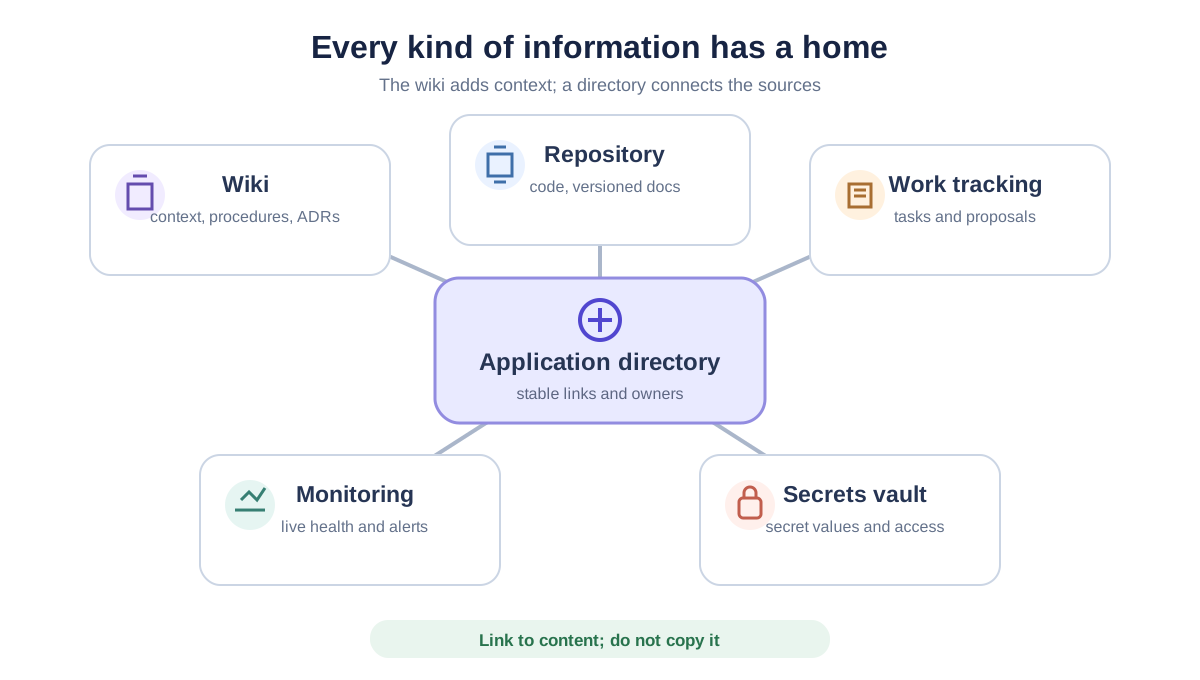
Not everything has to live in the wiki. A repository README should quickly explain what the project does and how to get started. Documentation tied closely to a particular code version may belong in the repository. Tasks and active proposals belong in the work management tool, secrets in a password manager and live operational data in monitoring. The wiki connects these sources and adds context, but it should not copy their content by hand.
Choose one primary location for each piece of information and link to it from everywhere else. This prevents three different deployment procedures from existing with no indication of which one is current. The Backstage Software Catalog, for example, separates the application catalog, ownership and links from the technical documentation itself.
For smaller teams, AboutTheApp can serve as a lightweight directory in the same way: keep links to the wiki, repository, monitoring and support next to the application while the content stays in the tools that own it. The project links guide shows the practical setup.
8. Introduce the wiki without turning it into a large project
Do not try to document everything at once. Begin with the most frequent and highest-risk situations: onboarding, local setup, deployment and outage response. Add the rest in response to real questions and changes to the application.
- 1
Create one home page
Describe the application's purpose, owner and main contacts. Add a simple map of the other documentation areas.
- 2
Write four essential documents
Start with local setup, an architecture overview, deployment and the first runbook for your most common incident.
- 3
Assign owners and change rules
Give each area an owning team and add a documentation check to the process for changing the application.
- 4
Test the wiki on a real task
Ask a less experienced colleague to follow a procedure without verbal guidance. Fix unclear steps and missing prerequisites.
- 5
Remove duplication continuously
When the same information appears in several places, choose the primary source and replace the other copies with links.
Frequently asked questions
What should be on the internal wiki home page?
A short application overview: its purpose, main users, owning team, contacts and links to architecture, development, deployment, operations and reference documentation.
Should documentation live in the wiki or the repository?
Documentation tied to a specific code version is often easier to maintain in the repository. A wiki works well for broader context, cross-team procedures and content for people outside engineering. Choose one primary source for each piece of information and link to it from everywhere else.
How often should we review the internal wiki?
Whenever a change affects a documented procedure, and after any incident that exposes a documentation problem. Critical operational procedures should also be reviewed and practiced regularly.
Which internal wiki tool should we choose?
Choose a tool the team will actually use, can search and can correct easily. Clear structure, ownership, change history, permissions and regular maintenance matter more than the product name.
Do passwords and API keys belong in an internal wiki?
No. Secrets belong in a password manager or secrets vault. The wiki should contain a safe procedure and, if useful, a link to an entry whose access is controlled by the appropriate tool.
In short
A useful internal wiki has a predictable structure, separates different documentation types and assigns an owner to every important page. It changes with the application, is tested through real work and does not copy data from tools that are already the source of truth.
 AboutTheApp
Do you have documentation that the team still struggles to find?
AboutTheApp can connect the wiki, repository, monitoring and other important resources in one directory for each application.