Software Design Document: Template and Example
How to write a design document that reviewers can assess before implementation: goals, constraints, architecture, alternatives, risks, operations and rollout.
Overview & context
A software design document, or design doc, turns requirements into a technical solution that people can review while it is still easy to change. A good design covers more than components and APIs. It explains goals, constraints, alternatives, risks, security, operations and how to release the change safely. This guide provides a practical template, an example and rules for reviewing and maintaining the document.
1. What a software design document is for
A design doc primarily explains how the team will solve a particular problem and what consequences the solution will have. The product requirements document (PRD) usually covers what is needed and why. A software requirements specification (SRS) records detailed functional requirements and how to verify them. The design builds on those requirements, but should not merely restate them in technical language.
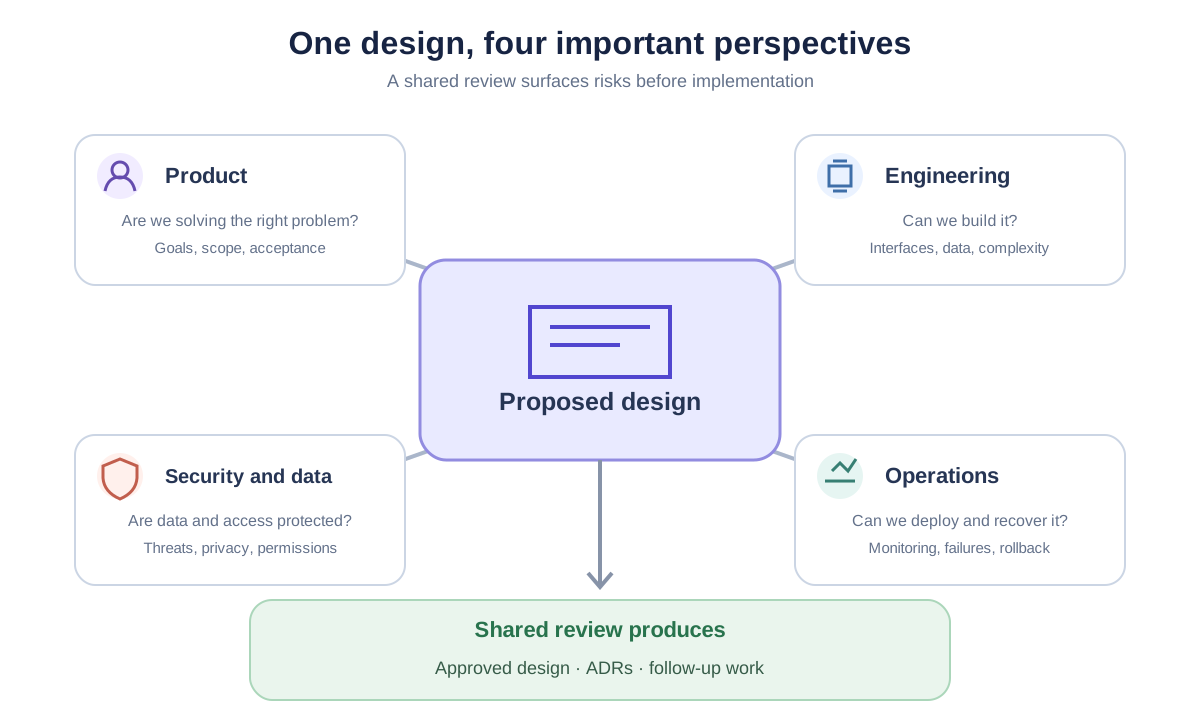
The main value of the document is early review. Engineering, operations, security or data teams can identify a missing requirement, unsafe assumption or less expensive option before implementation begins. After approval, the document records the original decisions and their rationale; it does not automatically remain an accurate description of a system that later changes.
A bug fix or small local change can usually be described in the work item. One significant decision may need only an ADR. A design doc becomes useful when a change crosses components, data, teams or quality requirements and needs a shared review.
2. There is no single mandatory template
IEEE 1016-2009 defines the content and organization of a Software Design Description, but its status has been Inactive-Reserved since 2020. It remains a useful reference and a contract may require it, but it is not a current universal prescription for every software team.
The current ISO/IEC/IEEE 42010:2022 addresses architecture descriptions. It focuses on stakeholders, their concerns and the views needed to address them, but does not mandate one chapter structure or notation. That principle is useful for an ordinary design doc too: document the views people need to evaluate this particular design.
For ongoing architecture documentation of a larger system, consider arc42. For diagrams, the C4 model moves from system context through containers to components. A shorter design doc for one change can borrow from these approaches without copying every section mechanically.
| Format | When it fits | What it captures |
|---|---|---|
| Design doc | A larger feature, new system or cross-cutting change | The proposed solution, alternatives, risks and delivery plan |
| ADR | One significant, long-lived decision | Context, decision, consequences and status |
| arc42 | Ongoing architecture documentation for a whole system | Multiple views from goals and context to operational risks |
| IEEE 1016 | A contract or process explicitly requires a formal SDD | Formal design content and stakeholder views |
3. Software design document template
Adapt the template to the risk and size of the change. You can omit a section that does not apply, but for security, migration or operations, briefly explain why. Reviewers can then distinguish a deliberate decision from an oversight.
# <System or change name>: Design

Author: <person or team>
Reviewers: <engineering, operations, security, product as needed>
Status: Draft | In review | Approved | Superseded
Date: <YYYY-MM-DD> · Requirements: <link> · Implementation: <link>

## 1. Summary and context
The problem, affected users and current state.

## 2. Goals and non-goals
- A measurable or verifiable goal
- Something deliberately outside the scope

## 3. Requirements, constraints and assumptions
Functional requirements and important quality goals: availability, performance,
security, privacy, accessibility, cost or regulatory obligations.
Technical and organizational constraints. Assumptions that need validation.

## 4. Proposed design
### 4.1 System context and boundaries
Users, surrounding systems, ownership and trust boundaries.
### 4.2 Components and responsibilities
The main parts of the solution and their relationships.
### 4.3 Critical runtime scenarios
How the system behaves in its most important flows and failure cases.
### 4.4 Data and interfaces
Data model, data ownership, APIs, events and backward compatibility.

## 5. Alternatives and trade-offs
| Option | Benefits | Drawbacks and risks | Decision |

## 6. Security and privacy
Authentication, authorization, sensitive data, threats, auditing and secrets.

## 7. Reliability and operations
Dependency failures, monitoring, alerts, capacity, backups, recovery and support.

## 8. Delivery, migration and rollback
Change order, data migration, feature flags, verification, rollout and rollback.

## 9. Testing and acceptance
How functional and quality goals will be verified, and who accepts the result.

## 10. Risks and open questions
- Risk or question · owner · deadline or validation method

## 11. Decisions and follow-up documentation
- Accepted decision · date · link to ADR, diagram, runbook or API
4. How to write and review the design
Microsoft recommends that a technical design cover API and data contracts, backward compatibility, security and privacy, rollout and rollback, testing, monitoring and alternatives. Not every change needs equal depth in every area; the detail should match the risk.
- 1
Define the problem and boundaries
Start with the current state, goals, non-goals and constraints. State measurable requirements such as expected load or recovery time instead of words like “fast” and “reliable.”
- 2
Describe the solution from the outside in
Show the system boundary and surrounding dependencies first, then components, critical runtime scenarios, data and interfaces. Give each diagram a title, legend and a short explanation of what reviewers should evaluate.
- 3
Compare real alternatives
Include doing nothing, buying a service or extending an existing component when they are realistic options. Explain the trade-offs in cost, complexity, delivery speed and operational risk.
- 4
Design for failure, migration and rollback
Explain what happens when a dependency is unavailable, a migration stops halfway or a deployment is only partly complete. Critical flows need detection, impact containment and a realistic path back to a safe state.
- 5
Choose reviewers based on risk
Alongside engineers, involve operations, security, data owners, testing or product when the impact calls for them. Do not always wait for a finished document; discuss or prototype the riskiest assumptions earlier.
- 6
Resolve blocking questions before implementation
A document can be approved with non-blocking follow-ups if they have an owner and deadline. Resolve uncertainties that may change the architecture, security or feasibility before expensive or hard-to-reverse work.
5. Short example: meeting room booking
This example shows an appropriate level of detail for a small internal application. A real design would add diagrams and links to specific requirements, API contracts and operational procedures.
# Meeting Room Booking: Design

Author: Internal Systems team · Reviewers: IT operations, security, product
Status: In review · Date: 2026-11-15 · Requirements: PRD-014

## 1. Summary and context
Bookings in a shared spreadsheet overlap and occupancy cannot be checked reliably.
A new internal web application will use the existing company sign-in.

## 2. Goals and non-goals
- Prevent two confirmed bookings for the same room at the same time.
- Display daily occupancy within 2 seconds at 200 concurrent users.
- Out of scope: payments and external calendar synchronization.

## 3. Requirements and constraints
- 99.9% monthly availability during business hours.
- Run only in company infrastructure; authenticate through OIDC.
- Keep the booker's name for 90 days after the booking ends.

## 4. Proposed design
A web frontend calls a REST API that stores rooms and bookings in PostgreSQL.
A database constraint on room and time range prevents concurrent writes of
overlapping bookings. The API returns HTTP 409 for a conflict.

Critical flow: user submits booking → API verifies OIDC token → database
accepts the write or rejects an overlap → application displays the current state.

## 5. Alternatives
| Option | Benefits | Drawbacks | Decision |
| Company calendar | No custom development | Does not enforce required room rules | Rejected after prototype |
| SaaS product | Fast rollout | Data outside company and per-user cost | Rejected due to constraints |

## 6. Security and privacy
Company accounts only. The API checks authorization on every request.
Secrets live in the vault, not in the repository or this document.

## 7. Reliability and operations
When the database is unavailable, new bookings are rejected with a clear error.
Monitoring covers API availability, error rate and latency. Daily backup,
with an RPO of 24 hours and an RTO of 4 hours.

## 8. Delivery and rollback
Deploy to staging with synthetic data, then pilot on one floor.
After validation, open the application to the company. Rollback disables access
to the new application; the spreadsheet remains read-only during the pilot.

## 9. Testing
Concurrent booking test, OIDC integration test, backup restore and a load test of the 2-second goal.

## 10. Risks and questions
- Confirm retention with the privacy owner · owner: product · due 2026-11-20
- Verify database constraint support on the target hosting · owner: engineering

## 11. Decisions
- Enforce overlap in the database, not only in the API · ADR-001
6. What reviewers should verify
A review should do more than check whether the diagram looks right. It should establish that the design solves the right problem, rests on validated assumptions and can be built, operated and reversed safely.
7. What happens after approval
An approved design is not an immutable promise. Tests, a prototype or a vendor limitation may expose a necessary change during implementation. Record a material deviation in the document or a follow-up ADR and ask the affected reviewers to evaluate it again.
When implementation is complete, record the actual status and link to the code, ADRs, operational procedures and current diagrams. Google recommends treating design docs as archives of decisions after implementation, not as half-correct operating documentation. Keep current APIs, deployment instructions and runbooks in their long-lived sources of truth.
8. Where to store the document
Store the document where reviewers can comment and where it remains available with the system's documentation. A repository and normal code review often work well for a design closely tied to code. A wiki or document system may be better for a cross-functional proposal. A stable link, change history, access controls and a clear owner matter more than the tool.
Link to the design from the requirements, implementation work and architecture index. If the team uses AboutTheApp as an application directory, the design doc can be one of the links next to the application. The document itself still stays in its source of truth. See How to Build an Internal Wiki for the wider documentation structure.
Describe how passwords, certificates and API keys are managed, but never include their values. A design document is usually shared more widely than the production vault.
Frequently asked questions
What's the difference between a design document and a PRD?
A PRD describes the problem, expected value and requirements. A design doc explains the technical solution, its constraints, alternatives, risks and safe delivery.
Is IEEE 1016 mandatory for a design doc?
Not in general. IEEE 1016-2009 has Inactive-Reserved status. Use it when a contract or your process requires it; otherwise choose a template that matches the risk and reviewers' needs.
Who should write and review the design document?
The person or team responsible for the solution usually writes it. Choose reviewers based on impact: engineering may need input from operations, security, data, testing, product or the owner of a surrounding system.
How long should a design document be?
As short as possible and detailed enough to evaluate important decisions and risks. A small change may need one page; a complex system may need several documents and views. Page count alone does not determine quality.
Should a design doc be updated after implementation?
Record material departures from the approved design. When work is complete, mark the document as implemented or superseded and link it to current architecture, API and runbook documentation. Do not use an old proposal as the only operating guide.
In short
A software design document lets people evaluate a technical solution while it is still easy to change. It connects goals and constraints to architecture, alternatives, security, operations, migration and verification. After implementation, it records decisions while current operating information remains in its own sources of truth.
 AboutTheApp
Need to connect the design with the rest of the application documentation?
AboutTheApp can provide a directory for requirements, designs, diagrams, the repository and operational documentation.