
Git Branching Strategies: Git Flow vs. Trunk-Based
A Git branching strategy defines how code gets from development to production. We compare Git flow, GitHub flow and trunk-based development and how to choose.
Overview & context
Every team has a branching strategy. Some teams have even written theirs down. A Git branching strategy defines where new code starts, how it reaches production and where fixes ship from. Below you'll find a comparison of Git flow, GitHub flow and trunk-based development and tips for picking one.
1. Why your branching strategy matters
Without an agreed strategy, long-lived branches and merge conflicts tend to pile up. It also gets unclear what's on which branch and which of it runs in production. Support then has a hard time telling whether a fix for a reported bug is already deployed.
The branching strategy also decides where versions and release notes come from. When it's clear which branch and tag a release ships from, you can find the changes between two releases without combing through commits by hand.
2. Git flow
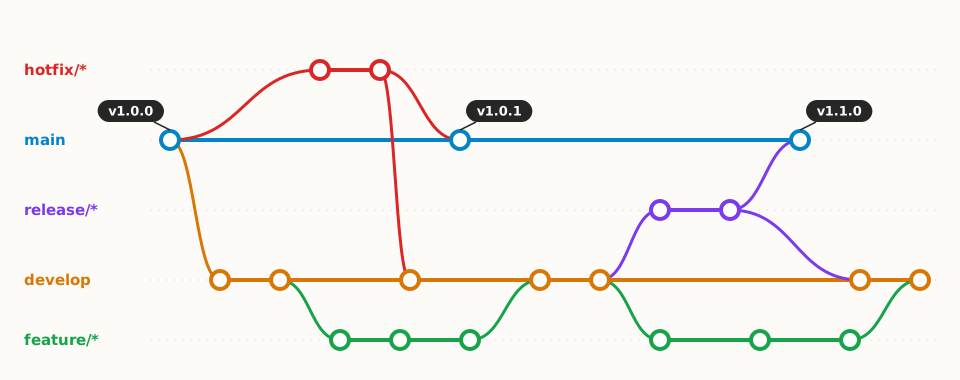
Vincent Driessen described Git flow in 2010. It uses two permanent branches: main for released versions and develop for ongoing work. New features live in feature branches, a release is prepared in a release branch and production fixes go into hotfix branches.
The model suits software with planned releases and several supported versions, such as libraries or apps installed at client sites. In his 2020 note, the author himself recommends a simpler workflow for continuously delivered web apps.
3. GitHub flow
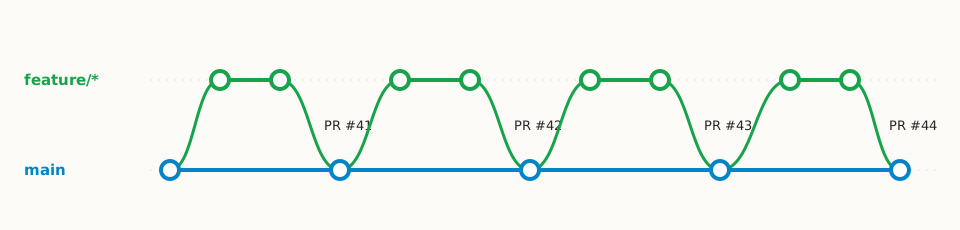
GitHub flow has a single permanent branch, main. Every change starts in a short branch, goes through review in a pull request, gets merged into main and deployed.
It fits web apps and services that deploy often and have one current version. Automated tests are a prerequisite, because main has to be ready to deploy at all times.
4. Trunk-based development
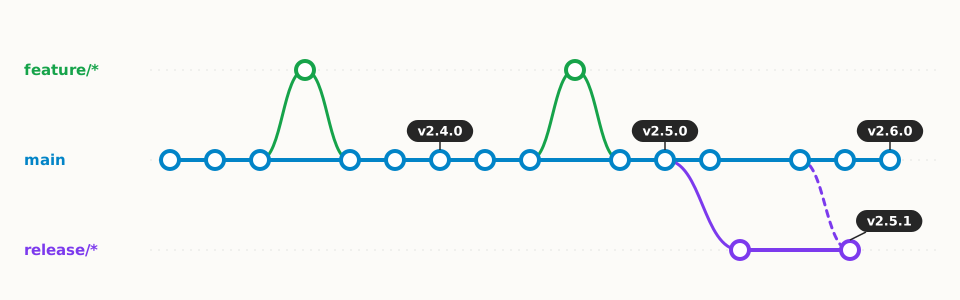
In trunk-based development, developers push small changes to the main branch (the trunk) several times a day, directly or through very short branches. Unfinished features hide behind feature flags, settings that switch a feature on only once it's ready.
A release gets a tag right on the main branch or a short release branch. The approach needs reliable automated tests and CI/CD, meaning automatic builds, tests and deployment after every change.
5. Git flow vs. GitHub flow vs. trunk-based development
No strategy is right for every team. What decides is how often you release and how many versions you support at once.
| Strategy | Permanent branches | How you release | Fits |
|---|---|---|---|
| Git flow | main, develop | Release branch, tag on main | Planned releases, several supported versions, client-site installs |
| GitHub flow | main | Deploy after merging a pull request | Web apps with one current version |
| Trunk-based | main (trunk) | Tag on main or a short release branch | Teams with automated tests and frequent deploys |
6. How to choose a branching strategy
A few questions help you decide.
7. Repository, pipeline and branches next to the app
The branching strategy lives in the repository, but the people around the app look for it elsewhere. A consultant or a new colleague needs to know where the repository is, where the pipeline runs, what the branch rules are and where to find open pull requests.
In AboutTheApp, you attach links to the repository on GitHub, GitLab or Bitbucket, the GitHub Actions pipeline, the branch protection settings, the pull request list and the file with your branching rules. AboutTheApp recognizes these services by their URL and shows their icon next to the link. If a client has their own release branch or a pipeline for their environment, you attach that link to their installation only. CI/CD can record versions from tags in the version catalog, including the release notes.
AboutTheApp holds the links to your repository and pipeline, but it doesn't load branches, tags or pull requests from Git. You record versions and deployments in the dashboard or send them from CI/CD.
Frequently asked questions
What is the best Git branching strategy?
There's no single best strategy. Web apps that deploy often usually do well with GitHub flow or trunk-based development. Software with planned releases and several supported versions fits Git flow.
Is Git flow still used?
Yes, mainly for libraries, desktop and mobile apps and software installed at client sites. For continuously delivered web apps, even the author of Git flow recommends a simpler workflow.
What is the difference between Git flow and GitHub flow?
Git flow has two permanent branches (main and develop) plus separate branches for releases and fixes. GitHub flow has only main, where short branches are merged through pull requests and deployed after merging.
What is trunk-based development?
A workflow where developers push small changes to the main branch several times a day and hide unfinished features behind feature flags. Releases are marked with a tag on the main branch.
Where should a branching strategy be documented?
In the repository, usually in CONTRIBUTING.md, so developers have it next to the code. It's worth linking it next to the app too, together with the repository and pipeline, for example in AboutTheApp, where people without repository access can find it.
In short
Your branching strategy should match how often you release and how many versions you support. Once it's written down and linked next to the app with the repository and pipeline, everyone who works with the app can find it.
Want your repository, pipeline and rules next to the app?
Add your app to AboutTheApp for free and attach links to the repository, pipeline and documentation.