Deployment Strategies: Blue-Green, Canary and Rolling
Deployment strategies decide how a new version of an app replaces the original. Compare recreate, rolling, blue-green and canary and see which to choose.
Overview & context
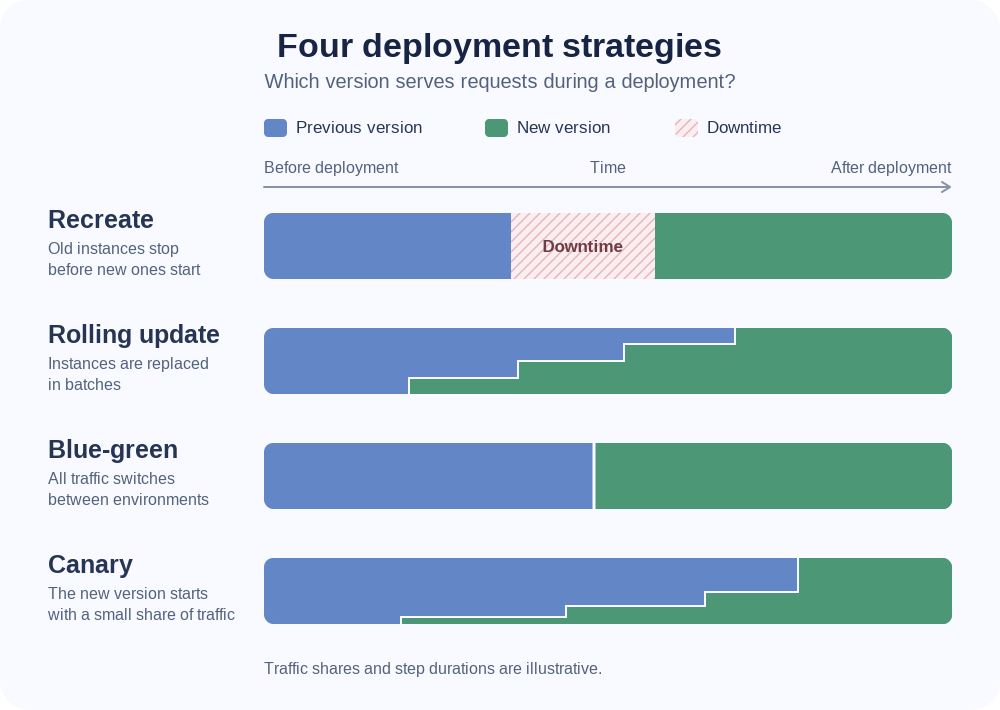
A deployment strategy is the plan for how a new version of an app replaces the original version: all at once, one instance at a time, through a second copy of the environment or for a limited group of users first. The four common strategies (recreate, rolling, blue-green and canary) differ in the downtime they cause, rollback speed, cost and how many users see a bug. Below you'll find how they compare, how to choose one and how to keep track of which version runs where while versions overlap.
1. What deployment strategies are and how they differ
A deployment strategy defines how the old version of an app on production gets replaced by the new one. Strategies are compared on four things.
Downtime is whether users run into errors while the version is swapped. Rollback speed is how long it takes to go back to the old version. Cost is the number of extra instances or environments you pay for during the swap. Blast radius is the share of users who see a version with a bug.
The examples use Kubernetes, because all four strategies can be shown there in one place. The principles are the same for a single server behind a reverse proxy or for a platform that handles deployment for you.
2. Recreate deployment: stop the old version and start the new one
A recreate deployment is the simplest strategy: all instances of the old version stop first and only then the new version starts. With the Recreate type, the Kubernetes documentation says all existing Pods are killed before new ones are created. The app doesn't respond in between.
It fits when two versions must not run at the same time, for example because the new version changes the database so that it's no longer compatible with the previous version. It also makes sense on test environments or for an app with a planned maintenance window. Extra cost is zero and a rollback means deploying the previous version.
3. Rolling deployment: gradual replacement of instances
A rolling deployment replaces instances gradually: it starts a new one, waits until it's ready and only then stops an old one. In Kubernetes it's the default deployment type and the app keeps responding throughout. The pace is set by maxSurge (how many extra instances may exist) and maxUnavailable (how many may be missing). Both default to 25% according to the documentation, maxSurge rounds up and maxUnavailable rounds down.
With the settings below there are never fewer than four ready instances and at most one extra. While the update runs, the old and the new version serve users together, so they have to work side by side against the same database.
If a new instance never starts, the rollout stops and the old version keeps serving users. After the default 600 seconds without progress (progressDeadlineSeconds) Kubernetes marks the deployment as failed. A rollback is another rolling update in the opposite direction. In Kubernetes the kubectl rollout undo command starts it.
spec:
  replicas: 4
  strategy:
    type: RollingUpdate
    rollingUpdate:
      maxSurge: 1
      maxUnavailable: 0
  progressDeadlineSeconds: 600
4. Blue-green deployment: two environments and one switch
A blue-green deployment keeps two identical production environments: one (blue) serves users and the new version goes to the other (green). In Martin Fowler's 2010 article you switch the router once the new version works, so all requests go to the green environment.
A rollback is fast, because the original environment stays running and if there's a problem you just flip the switch back. The price of this variant is the cost of two running environments during the transition and an all-or-nothing switch: if the new version is problematic, everyone sees the errors until you switch the environment back.
Test the green environment on a separate address before the switch. It isn't the same as staging: staging verifies a release before deployment, while green is a second copy of production waiting for the switch. In Kubernetes you can switch by changing the version label in a Service selector from blue to green.
Both environments usually share one database. That's why Fowler recommends separating the deployment of schema changes from application upgrades, see section 7.
apiVersion: v1
kind: Service
metadata:
  name: web
spec:
  selector:
    app: web
    version: green
  ports:
    - port: 80
      targetPort: 8080
5. Canary deployment: a small group of users first
A canary deployment makes the new version available to a small group of users first and opens it to everyone else once it's proven to work. According to an article on Martin Fowler's site, it means rolling out a change to a small subset of users before rolling it out to the entire infrastructure.
The simplest canary in Kubernetes is two Deployments behind one Service: a stable one with several instances and a canary with one. With one canary instance out of five, roughly every fifth request gets the new version, so the share depends on the instance count. Exact ratios such as 1% need routing at the ingress level or the Gateway API, where you set weights on the backends of an HTTPRoute. Tools like Argo Rollouts raise the share step by step and roll back automatically.
A canary only makes sense if you can compare the metrics of the new and the stable version: error rate and latency split by version. For example, a 2% error rate on the canary means nothing if the stable version shows 2% too. A canary also catches only what your metrics can see. A bug that corrupts data without changing error rate or latency slips through, so watch business metrics as well, such as completed orders or signups.
6. Deploying isn't releasing: feature flags
Deploying code to servers and releasing a feature to users can be separated with feature flags, switches that turn a feature on and off. The new code ships with the feature off, you turn it on for selected users first and a rollback means flipping the flag with no new deployment. The article on feature toggles builds on the principle of separating feature release from code deployment.
Flags aren't free. According to the same article, release toggles are transitional and shouldn't stay much longer than a week or two, so decide when you'll remove a flag the moment you create it.
7. Database migrations during deployment: expand and contract
With rolling, blue-green and canary deployments the old and the new version work against the same database, so split a schema change into three steps following the Parallel Change pattern, also known as expand and contract.
Renaming a column this way takes three deployments instead of one. Never ship a breaking schema change together with the code that needs it, because the old version would stop working once the column is gone. Rolling back the code doesn't roll back the data the new version wrote in the meantime.
- 1
Expand
Add only new things, for example a new column that may be empty. The old version ignores it and the new one can use it.
- 2
Migrate
Deploy code that writes to both the old and the new column and backfill the existing rows. Move reads to the new column only after that's done.
- 3
Contract
Remove the old column in a separate deployment, once the old version runs nowhere.
8. How to choose a deployment strategy
Choose a strategy based on what you can detect quickly and how fast you need to bring the old version back. No strategy saves you from a failure you can't detect. If you can't tell that a new version is bad, improve your monitoring before you improve your deployment.
For most web apps a rolling deployment with a proper readiness check is enough, as long as the new and the old version work side by side. Pick blue-green when an instant rollback matters and you can pay for the second environment. A canary suits risky changes where you can compare metrics by version. Keep recreate for cases where two versions must not run at the same time.
| Strategy | Downtime | Rollback | Extra cost | Blast radius |
|---|---|---|---|---|
| Recreate | Yes, between versions | Deploy the old version again | None | All users |
| Rolling | No | Slow, another rolling update | A few extra instances | Grows as the update proceeds until the readiness check stops it |
| Blue-green | No | Instant, switch back | Second environment during the transition | All users after the switch |
| Canary | No | Fast, remove the canary | Extra instances | Only the share of users on the canary |
9. How to track which version runs where during a deployment
During a rolling update or a canary two versions run at once and with blue-green the live version changes at the moment of the switch. Support and the customer then need to know which version a user is on right now. The pipeline log can't tell them.
In AboutTheApp a deployment is a record of which version runs for a customer in a given environment, with its URL and location. The abouttheapp/sync step at the end of the deploy job writes it, as the guide to GitHub Actions CI/CD describes, using the customer-alias and environment inputs. Record the deployment when users start receiving the version, not when the deployment begins.
If you record a deployment again, the previous record for the same customer and environment ends and a new one is added, so the history stays, rollbacks included. Rerunning the workflow adds another record.
For versions that run side by side, the About box inside the app shows the exact version if you pass it the build's version in the version attribute, as the guide to displaying the app version explains. A user on the canary then puts the new version into the bug report even though everyone else is on the old one. Which deployment sets the version in the About box and on the customer's public page is chosen with the Set current action in the deployment list.
AboutTheApp doesn't switch traffic or start deployments. It only records which version runs where. Your pipeline or you in the dashboard have to write the record.
| Strategy | When to record the deployment | Environment |
|---|---|---|
| Recreate | After the new version starts | production |
| Rolling | After the update finishes | production |
| Blue-green | The new environment separately before the switch, production after it | For example preview, then production |
| Canary | Separately while the canary runs, production after promotion | For example canary, then production |
| Rollback | Record the previous version again with the same step | production |
Frequently asked questions
What are the main deployment strategies?
Recreate, rolling, blue-green and canary. A/B testing and shadow traffic are often listed next to them. They don't aim at a safe version swap though: A/B testing compares variants by user behavior and shadow traffic sends a copy of real requests to the new version and discards its responses.
What's the difference between blue-green and canary deployment?
Blue-green moves all users from one environment to the other at once and the rollback is instant. A canary sends the new version to a small group of users first and raises the share step by step, so fewer people see a bug, but you need to compare the metrics of both versions.
What is a rolling deployment?
A rolling deployment replaces the instances of an app gradually: it starts a new instance, waits until it's ready and then stops an old one. The app keeps responding, but both versions run together while the update lasts.
Which deployment strategy is the default in Kubernetes?
RollingUpdate is the default. You have to set the Recreate type in the Deployment spec. Kubernetes has no built-in blue-green or canary. You build them from several Deployments and Services or use tools such as Argo Rollouts.
What's the difference between deploying and releasing?
Deploying puts code on the servers and releasing shows the feature to users. A feature flag separates the two: the new code ships with the feature off and you turn it on later, for example for selected users first.
Does blue-green deployment need two databases?
Usually not. Both environments typically share one database, so schema changes have to work with the old and the new version. The usual approach is the expand and contract pattern.
How do you roll back a failed deployment?
With blue-green you switch traffic back to the original environment. With a canary you remove the canary instances. With a rolling deployment you deploy the previous version. In Kubernetes the kubectl rollout undo command does it. A rollback doesn't undo data the new version wrote, so plan migrations that can be reversed.
How do I record which version runs where during a deployment in AboutTheApp?
Record the deployment from the pipeline with the abouttheapp/sync step and its customer-alias and environment inputs, at the moment users start receiving the version. After a rollback, record the previous version again. AboutTheApp doesn't switch traffic. It only records what runs, from CI/CD or by hand in the dashboard.
In short
Choose a deployment strategy by how quickly you can detect a failure and how fast you need the old version back. Whichever you pick, record which version runs where.
 AboutTheApp
Want to know which version runs where?
Add your app to AboutTheApp for free, record deployments for each environment and keep track even during a gradual rollout.